Piano practice that shows its work
“Am I getting any better?”
Now you can see.
SoundDojo listens through your MIDI keyboard and shows where a rep broke down. Notes, timing, touch. Drill the measure you can’t land, come back, see what moved.
The loop
Play. See the score. Fix the weak spot.
Play
Plug in any MIDI keyboard. Pick something to work on. SoundDojo is listening.
See
Live feedback updates as you play: notes, timing, touch, and the spots that need another pass. You learn where you stand.
Repeat
Drill the number that’s dragging the others down. Leave. Come back. It will have moved.
A scale that fights back
Scales, chord shapes, the kinds of fundamentals that benefit from target practice. In SoundDojo the notes move toward you as targets. Pop the right ones in time and you finish the rep. Miss and the screen tells you which note, which beat. It plays like a game. The scoring gives it away.
- Targets cover notes, chords, holds, and dynamics
- Each note scored on pitch, timing, and touch as you play it
- Combos reward clean runs, not lucky ones
- Same engine powers scale runs, chord drills, and Endless
The rep tells on itself.
Notes, timing, touch. You can see what slipped before the rep is over and which measure needs another pass. The rest is the same thing every piano teacher has told you for a hundred years: drill the weak spot until it isn’t.
Playing the right ones
Playing them on time
Playing them with feeling
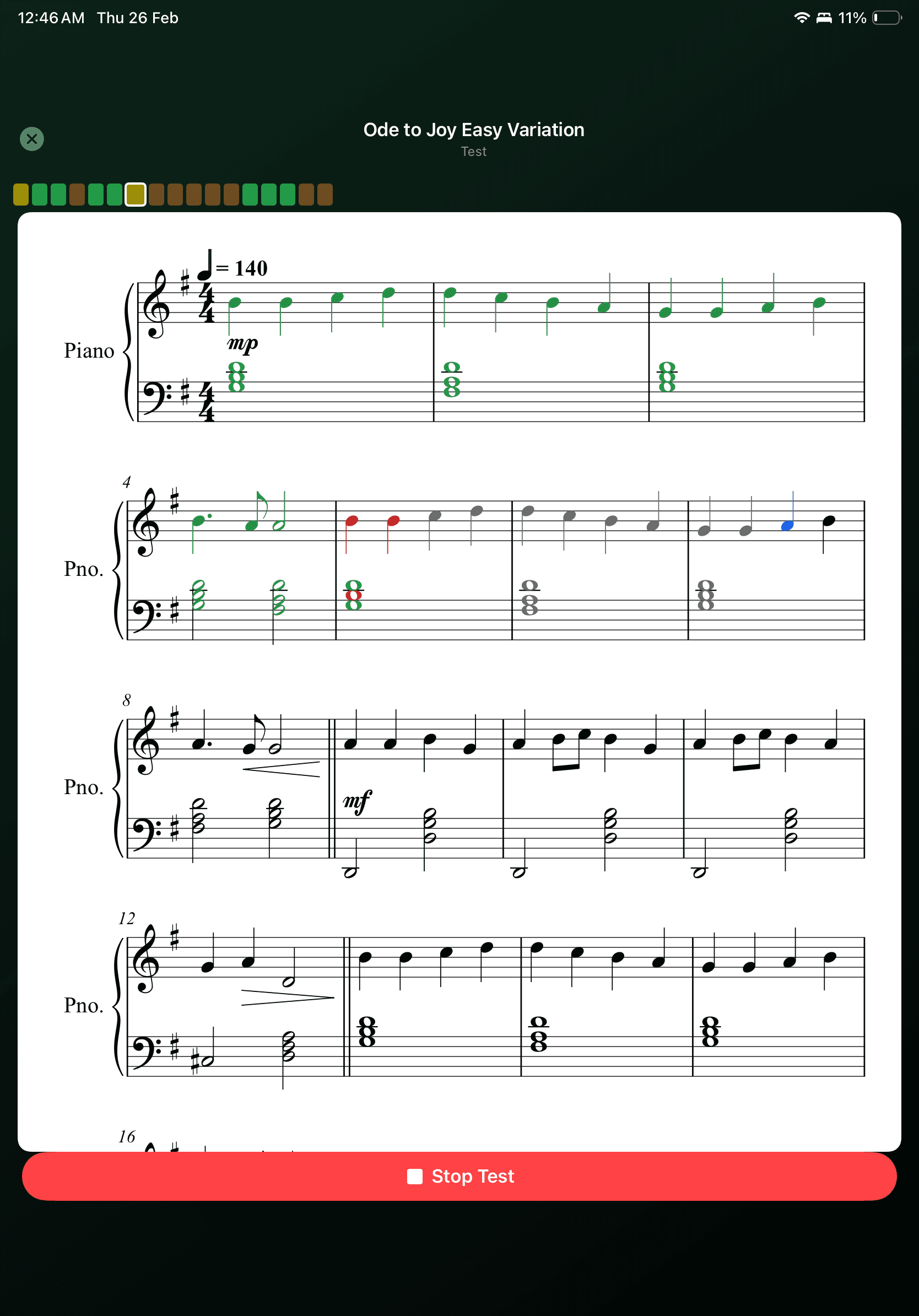
For when the exercises aren’t enough.
Import a score. SoundDojo breaks it into practice chunks. Pick the measures that keep tripping you up, work them hands-separate, put them together. Mark up the page however helps. It’s still there next session, measure by measure, with the history of what you’ve drilled.
- MusicXML and MXL from MuseScore, Dorico, Sibelius, or anywhere else
- Auto-chunks passages into 2–4 measure drills
- Hands-separate practice on any selection
- Pen, highlighter, and eraser markup that carries into practice
- Attempt history per chunk, so you know which ones you own
The Learning Path
You always know what to play next.
Eight checkpoints. The next drill is always waiting, and the path doesn’t advance until your playing says it should.
Find Home
Your first note, first octave, first key — and the pull of tonic
Feel the Beat
Lock into pulse and learn to play in time
Shape Time
Lengths, rests, subdivisions — lands on Ode to Joy
Find the Turn
Fingering as a route — thumb-under, left-hand mirror, both hands at once
Key Worlds
C, G, and F major — one pattern, three colors
Build Chords
Triads, voicings, and harmony that actually clicks
Shape Touch
Dynamics and accent — the feeling inside the pattern
Pull and Color
Tension, release, and the chords that make songs move
When the Path ends, the work doesn’t.
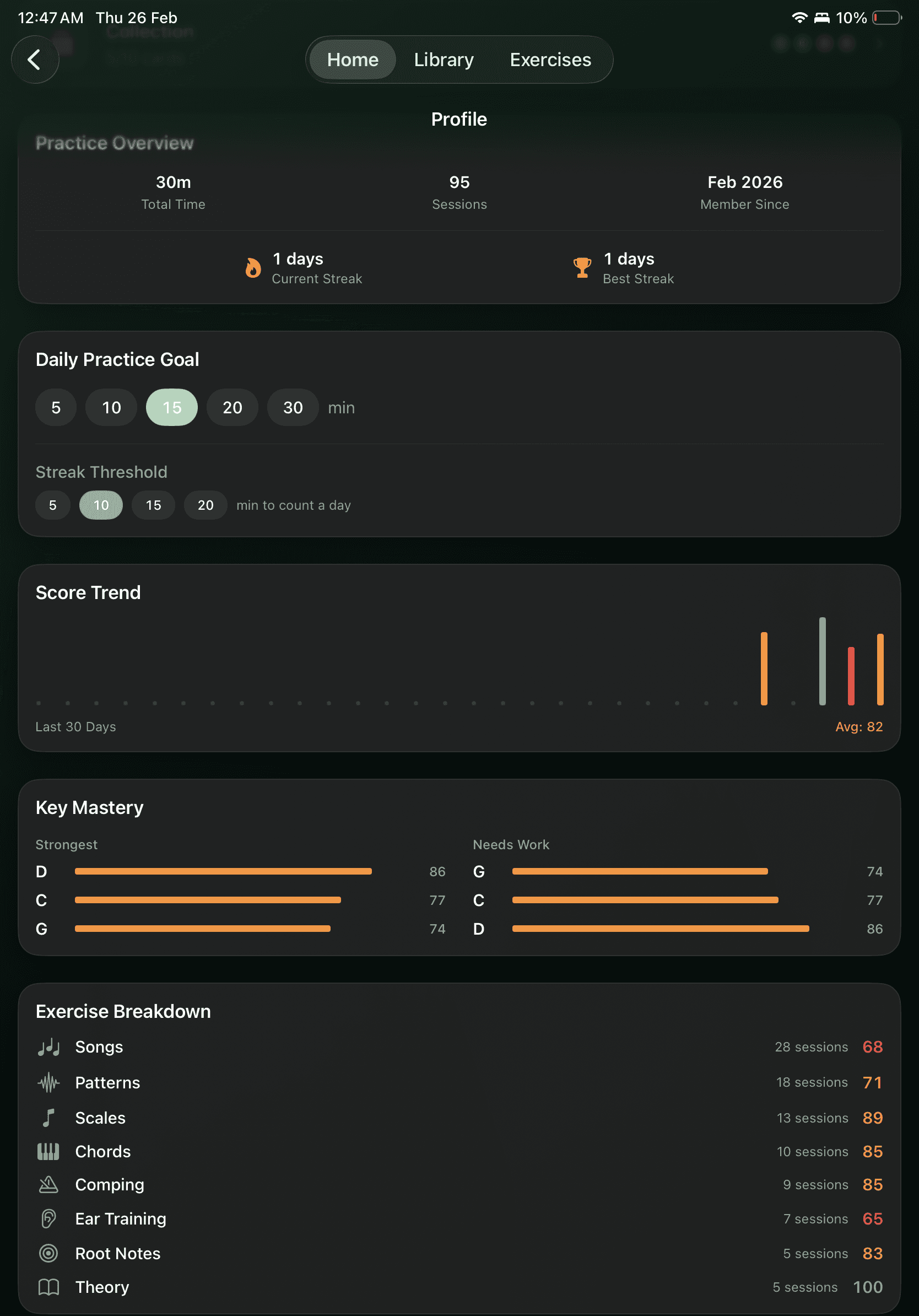
The skills that graduate out of the Path keep their own trail in Mastery. They sharpen with practice, surface for review before they go rusty, and push into new keys, hands, and tempos when you’re ready. You play. The stats keep the books on which skills are holding up.
- Per-concept tracking: fresh, stale, retained
- Review surfaces on its own before a skill fades
- Mission ladders push drills into new keys, hands, and tempos
- Stages advance only on clean reps, not attendance
- Per-concept stats so you can point to what improved
Curious how harmony works?
Free Play lights up a grid as you play. Chord shapes, progressions, and voice-leading show themselves. A sandbox for when you feel like poking around, with no score at the end of it.
Practice you can point at.
Join the TestFlight.
Early testers with an iPad and a MIDI keyboard get first access, a direct line to the team behind this, and a say in what comes next.
Limited spots. Your feedback shapes the app.